
GitHub WebHook Integration
Collect GitHub events (via webhooks), transform them to cdevents.
- Github tracks all changes to repositories, issues, pull requests, releases, workflows, and more. And it notifies a webhook about these changes.
- cdviz-collector transforms these events to cdevents, and sends them to the database, listeners,...
| From event | CDEvents |
|---|---|
| package.published | artifact.published |
| release.published | artifact.published |
| create (branch) | branch.created |
| delete (branch) | branch.deleted |
| pull_request.opened | change.created |
| pull_request.closed | change.{merged, abandoned} |
| pull_request.* | change.updated |
| pull_request_review.submitted | change.reviewed |
| workflow_run.requested | pipelineRun.queued |
| workflow_run.in_progress | pipelineRun.started |
| workflow_run.completed | pipelineRun.finished |
| workflow_job.in_progress | taskRun.started |
| workflow_job.completed | taskRun.finished |
| issue.opened | ticket.created |
| issue.closed | ticket.closed |
| issue.* | ticket.updated |
Configuration
CDviz Side
Setting up cdviz-collector.toml to receive GitHub events involves defining a webhook source in the collector configuration file. Below is an example configuration snippet:
# Remote transformers repository configuration
[remote.transformers-community]
type = "github://cdviz-dev/transformers-community"

[sources.github_webhook]
enabled = true
transformer_refs = ["github_events"]

[sources.github_webhook.extractor]
type = "webhook"
id = "000-github"
headers_to_keep = []

[sources.github_webhook.extractor.headers]
"x-hub-signature-256" = { type = "signature", signature_encoding = "hex", signature_on = "body", signature_prefix = "sha256=", token = "changeme" }


# Transformer from transformers-community repository
[transformers.github_events]
type = "vrl"
template_rfile = "transformers-community:///github_events/transformer.vrl"
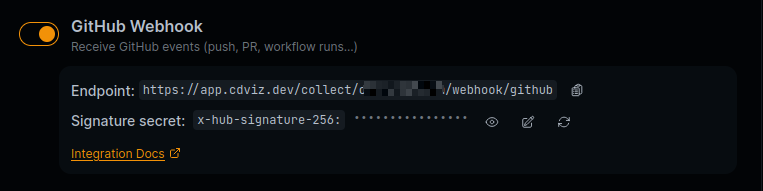
The signature field is used to verify the authenticity of the webhook payload. You should replace "changeme" with your actual secret token that you set in your GitHub webhook configuration.
The template_rfile references the VRL (Vector Remap Language) file from the transformers-community repository that contains the transformation logic for converting GitHub webhook events into CDEvents. The source code can be found at github_events/transformer.vrl.
For more details on remote transformers, including using specific tags or commits, see the Transformers documentation.
The webhook endpoint to declare on GitHub's side is then http://your-collector-url/webhook/000-github.
GitHub Side
To configure the GitHub integration, you need to set up a webhook in your GitHub repository or in your GitHub Organization. Here are the steps to do that:
- Go to your GitHub repository or organization settings.
- Navigate to the "Webhooks" section.
- Click on "Add webhook".
- In the "Payload URL" field, enter the URL where your
cdviz-collectoris running, followed by/webhook/{id_of_webhook_extractor}. For example:http://your-collector-url/webhook/000-github. - Set the "Content type" to
application/json. - In the "Secret" field, enter the secret from the CDviz Side section above.
- Select the events you want to trigger the webhook. You can choose "Let me select individual events" and select the events you are interested in, or you can select "Send me everything" to receive all events.
- Branch or tag creation
- Branch or tag deletion
- Issues
- Packages
- Pull requests
- Pull request reviews
- Releases
- Repository
- Workflow jobs
- Workflow runs
- Make sure the "Active" checkbox is checked.
- Click on "Add webhook" to save the configuration.
Complementary: GitHub Action Integration
For enhanced control and custom events, you can also use the GitHub Action integration alongside or instead of webhooks.
These approaches can be used together for comprehensive event coverage:
| Feature | Webhook Integration | GitHub Action |
|---|---|---|
| Setup | Configure webhook + collector | Add action to workflow |
| Event Control | All GitHub events | Custom events only |
| Custom Data | Limited to webhook payload | Full control |
| Timing | Real-time | Workflow-controlled |
| Maintenance | Central configuration | Per-workflow setup |
Recommended combinations:
- Webhooks only: Complete GitHub activity tracking with automatic setup
- GitHub Action only: Custom events for specific workflows with full control
- Both together: Comprehensive GitHub events (webhooks) + custom workflow data (actions)
Example combined use case: Use webhooks to track all repository activity automatically, while adding GitHub Actions to specific deployment workflows to send detailed deployment context and custom metrics.
For step-by-step instructions, see the GitHub Action Integration Guide.